docker nexus + S3 repository 만들기 실습
출처 : 패스트캠퍼스 Kubernetes와 Docker로 한 번에 끝내는 컨테이너 기반 MSAubunto 18.04 버전t3.medium8081 오픈t3.small 으로 하면 nexus 실행이 정상 동작하지 않는다. 기본스펙은 되고 log 도 딱히 실패로그가 안남아서
출처 : 패스트캠퍼스 Kubernetes와 Docker로 한 번에 끝내는 컨테이너 기반 MSA
EC2 생성
- ubunto 18.04 버전
- t3.medium
- 8081 오픈
t3.small 으로 하면 nexus 실행이 정상 동작하지 않는다. 기본스펙은 되고 log 도 딱히 실패로그가 안남아서 한참 삽질함.
# apt 업데이트
$ sudo apt update

# java 설치
$ sudo apt install -y default-jdk
$ javac -version

# docker 설치
$ sudo apt install -y docker.io
$ sudo chmod 666 /var/run/docker.sock
$ docker ps

# aws-cli 설치
$ sudo apt install -y awscli
aws profile 설정
아래처럼 profile 을 등록해줄수 있다.
$ aws configure --profile user1

AWS Access Key ID [None]: ~~
AWS Secret Access Key [None]: ~~
Default region name [None]: ap-northeast-2
Default output format [None]: json
s3 리스트를 조회해서 프로필에 맞는 버킷들을 가져오는지 확인. 내경우 bonjugi-bucket 을 만들어둔적이 있어서 조회된다. 각자 기본버켓이 있다면 조회될 것이다.
$ aws s3 ls

2022-05-14 14:13:58 bonjugi-bucket
참고로 프로파일은 동적으로 바꿔줄수 있다. AWS CLI에 사용되는 명명된 프로파일 문서를 참고.
nexus 설치
# nexus 설치 (실행이 다 되면 `{public dns}:8081` 로 웹콘솔 접속 가능)
$ docker run --name nexus -d -p 8081:8081 -v ~/nexus-data:/nexus-data -u root sonatype/nexus3

# admin 패스워드 확인
$ docker exec -it nexus bash -c "cat /nexus-data/admin.password"
admin 권한이 있는 다른계정 생성
- 설정 -> security -> users - create local user
- 정보 모두 입력. 권한은 nx-admin 추가 필요.
blob 스토어 생성
what is a blob store?
프록시 저장소를 통해 다운로드하거나 호스팅된 저장소에 게시하는 바이너리 자산은 해당 저장소에 연결된 blob 저장소에 저장됩니다. 전통적인 단일 노드 NXRM 배포에서 blob 저장소는 일반적으로 sonatype-work 디렉토리 내의 로컬 파일 시스템 디렉토리와 연결됩니다. 자세한 내용은 문서를 확인하세요.
생성
- 설정 -> Blob Stores -> create blob store
- 내용 입력 Type : S3 Name : bonjugi-test-docker-nexus-repository Region : ap-northeast-2 Bucket : bonjugi-test-docker-nexus-repository // 버켓네임은 다른 유저와도 중복될수가 없다. 중복되면 다른걸로 입력. Prefix : test Expiration Days : 3 // ???
생성 확인
S3 TYPE 으로 생성되었는지, availiable space 가 unlimited 로 생성되었는지 체크 한다.
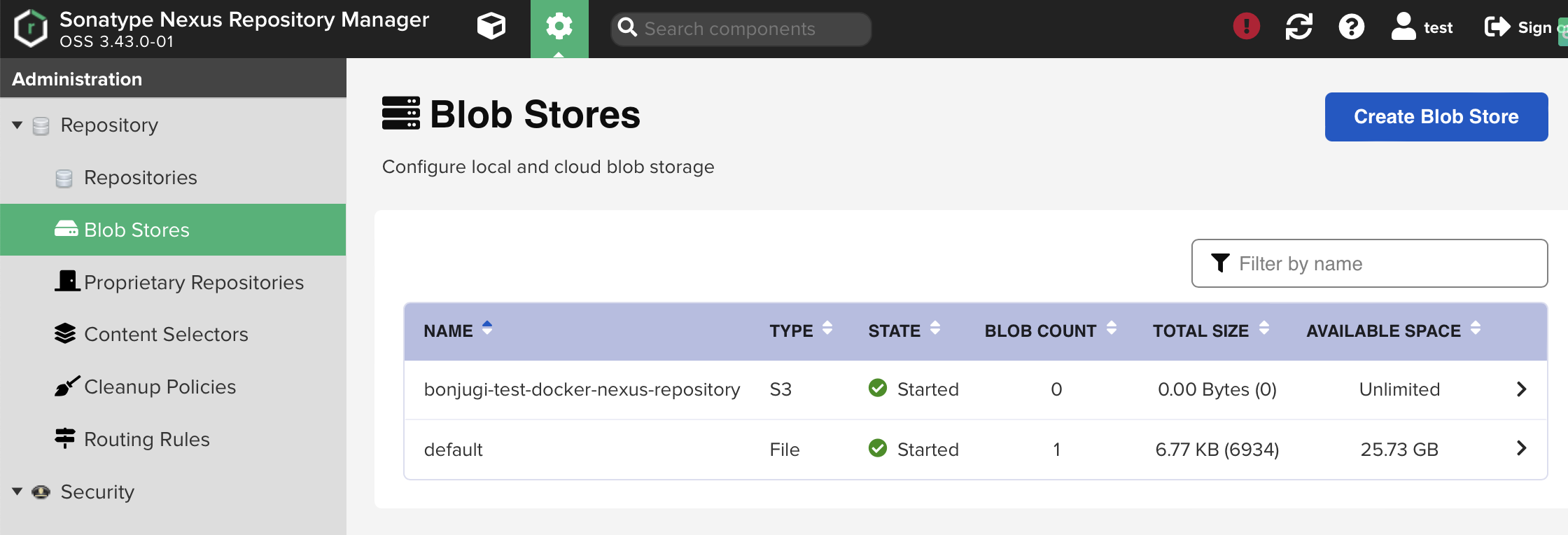
버킷과 넥서스가 필요로 하는 properties 파일 등이 생성됐는지 체크한다.
$ aws s3 ls bonjugi-test-docker-nexus-repository/test/

2022-12-11 05:46:38        300 D7DE4D19-D49D2680-EB34B2E9-601E9FA0-9137902F-metrics.properties
2022-12-11 05:46:38         40 metadata.properties
repository 생성
생성한 blob 스토어를 사용하는 repository 를 만든다. proxy 타입의 repository 를 만들어보자.
- maven2 선택
- 내용 입력 version policy : mixed layout policy : permissive content disposition : inline remote storage : https://repo1.maven.org/maven2/
proxy 타입? : 직접 업로드를 할수있는 레포는 아니고 다른 repository 와 중계역할을 한다. 또한 central 에서 한번 가져오면 blob 스토어에 캐싱 한다.